var q1 = from orderitem in q2
                     join pd in _iProductDetailContract.Entities on   orderitem.ProductDetailId equals pd.Id
                     join pm in ProductMainContract.Entities on pd.ProductMainId equals pm.Id
                     join user in UserContract.Entities on pm.BuyerId equals user.Id
                     into orderItemBuyer
                     from user in orderItemBuyer.DefaultIfEmpty()
                     group new { orderitem.Price, orderitem.Num }
                     by new { orderitem.ProductDetailId, orderitem.Name, orderitem.Size, orderitem.Price, pm.AliasName, BuyerName = user.Name }
                     into g
                     orderby g.Sum(p => p.Num) descending
                     select new
                     {
                         ProductDetailId = g.Key.ProductDetailId,
                         Name = g.Key.Name,
                         Size = g.Key.Size,
                         AliasName = g.Key.AliasName,
                         BuyerName = g.Key.BuyerName,
                         Num = g.Sum(p => p.Num),
                         Price = g.Key.Price,
                         TotlePrice = g.Sum(p => p.Num * p.Price)
                     }
                     ;
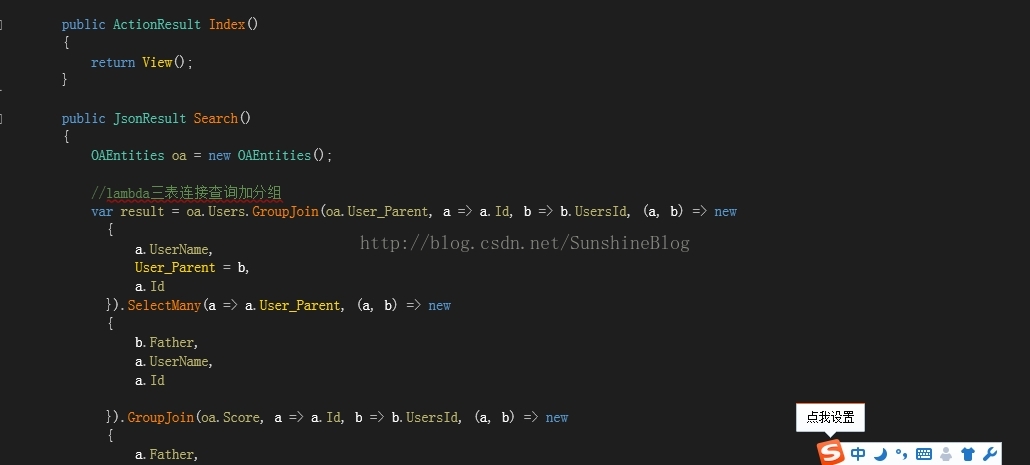
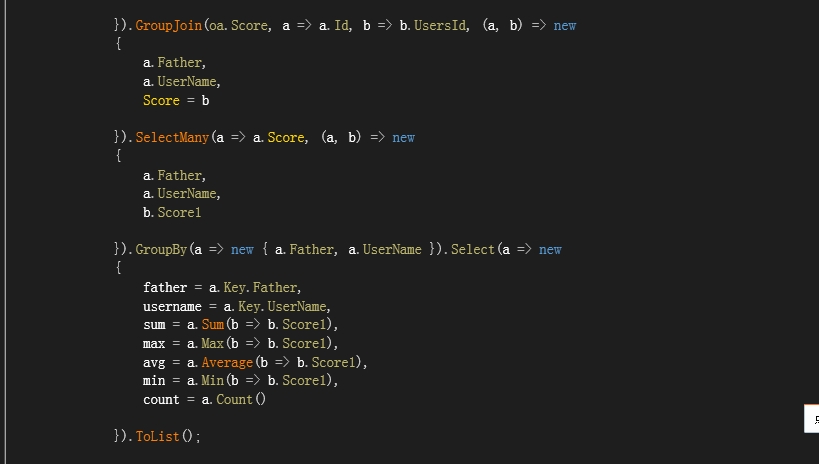
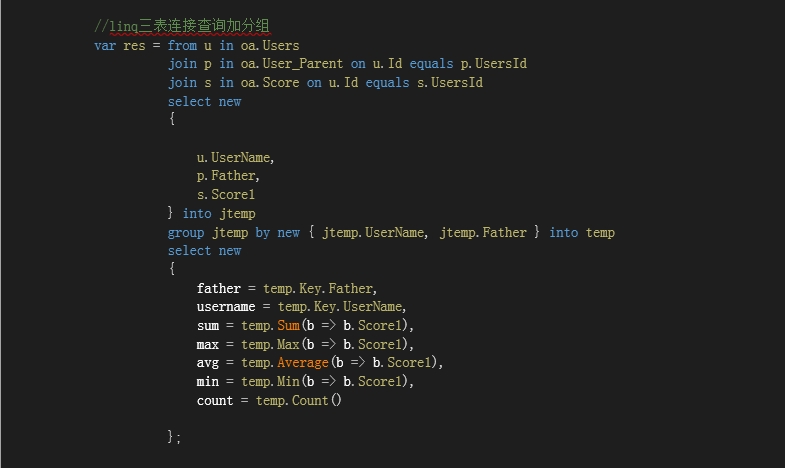
Lambda和Linq三表连接查询加分组

三表连接查询加分组的方法
方法一:Lambda
方法二:Linq
数据库事例:
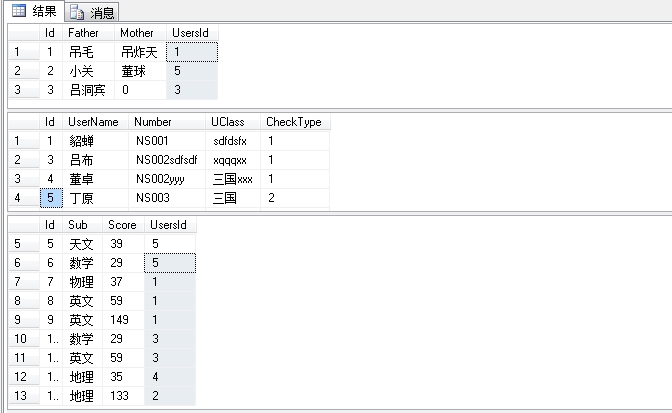
效果图:

.NetCore JWT认证

1、创建.net core web api项目:
Create a Web API with ASP.NET Core and Visual Studio
按照上面链接创建项目。
2、添加JWT(Bearer Token)认证
- 在项目的Startup.cs文件中的ConfigureServices方法添加以下代码添加并配置JWT认证:
            //添加jwt验证:services.AddAuthentication(JwtBearerDefaults.AuthenticationScheme)
    .AddJwtBearer(options => {
        options.TokenValidationParameters = new TokenValidationParameters
        {
            ValidateIssuer = true,//是否验证Issuer
            ValidateAudience = true,//是否验证Audience
            ValidateLifetime = true,//是否验证失效时间
            ValidateIssuerSigningKey = true,//是否验证SecurityKey
            ValidAudience = Configuration["audience"],//Audience
            ValidIssuer = Configuration["issuer"],//Issuer,这两项和签发jwt的设置一致
            IssuerSigningKey = new SymmetricSecurityKey(Encoding.UTF8.GetBytes(Configuration["SecurityKey"]))//拿到SecurityKey
        };
     });
其中 Configuration[“audience”]、Configuration[“issuer”]、Configuration[“SecurityKey”]为读取项目中appsettings.json文件中的自定义字符串。
appsettings.json文件:
{
  "Logging": {
    "LogLevel": {
      "Default": "Warning"
    }
  },
  "AllowedHosts": "*",
  "SecurityKey": "dd%88*377f6d&f£$£$#$%#$%#$FF33fssDG^!3",
  "issuer": "guetServer",
  "audience": "guetClient"
}- 在项目的Startup.cs文件中的Configure方法添加以下代码配置授权:
app.UseAuthentication();//配置授权- 签发JWT
首先自定义API连接返回的数据类型在项目的Models文件夹添加RestfulData类,新建类文件,对应命名空间里面定义三个类,代码如下:
    public class RestfulData
    {
        /// <summary>
        /// <![CDATA[错误码]]>
        /// </summary>
        public int code { get; set; }

        /// <summary>
        ///<![CDATA[消息]]>
        /// </summary>
        public string message { get; set; }

        /// <summary>
        /// <![CDATA[相关的链接帮助地址]]>
        /// </summary>
        public string url { get; set; }

    }

    /// <summary>
    ///
    /// </summary>
    /// <typeparam name="T"></typeparam>
    public class RestfulData<T> : RestfulData
    {
        /// <summary>
        /// <![CDATA[数据]]>
        /// </summary>
        public virtual T data { get; set; }
    }

    /// <summary>
    /// <![CDATA[返回数组]]>
    /// </summary>
    /// <typeparam name="T"></typeparam>
    public class RestfulArray<T> : RestfulData<IEnumerable<T>>
    {

    }
在项目中Models文件夹新建TokenObj类,代码如下
    public class TokenObj
    {
        public string token { get; set; }//token内容

        public long expires { get; set; }//过期时间
    }
做好以上准备之后在项目的Controllers文件夹里面新建一个API控制器类,如下图:

命名为OAuthController.cs。
将里面的方法全部删除,添加入以下代码
        private readonly IConfiguration _configuration;

        public OAuthController(IConfiguration configuration)
        {
            _configuration = configuration;
        }

        /// <summary>
        /// <![CDATA[获取访问令牌]]>
        /// </summary>
        /// <param name="user"></param>
        /// <param name="password"></param>
        /// <returns></returns>
        [HttpPost]
        public async Task<RestfulData<TokenObj>> Token(string user, string password)//同步方法
        {
            var result = new RestfulData<TokenObj>();
            try
            {
                if (string.IsNullOrEmpty(user)) throw new ArgumentNullException("user", "用户名不能为空!");
                if (string.IsNullOrEmpty(password)) throw new ArgumentNullException("password", "密码不能为空!");

                //验证数据库用户名和密码
                //var userInfo = await _UserService.CheckUserAndPassword(user,  password);
                var claims = new Claim[]
                {
                    new Claim(ClaimTypes.Name,user),
                    new Claim(ClaimTypes.NameIdentifier,password),
                };

                var key = new SymmetricSecurityKey(System.Text.Encoding.UTF8.GetBytes(_configuration["SecurityKey"]));
                var expires = DateTime.Now.AddDays(30);//
                var token = new JwtSecurityToken(
                            issuer: _configuration["issuer"],
                            audience: _configuration["audience"],
                            claims: claims,
                            notBefore: DateTime.Now,
                            expires: expires,
                            signingCredentials: new SigningCredentials(key, SecurityAlgorithms.HmacSha256));

                //生成Token
                string jwtToken = new JwtSecurityTokenHandler().WriteToken(token);
                result.code = 200;
                result.data = new TokenObj() { token = jwtToken, expires = expires.ToFileTimeUtc() };
                result.message = "授权成功!";
                return result;
            }
            catch (Exception ex)
            {
                result.message = ex.Message;
                result.code = 400;
                // logger.Error("获取访问令牌时发生错误!", ex);
                return result;
            }
        }
下面添加Swagger UI并验证JWT认证。
3、添加Swashbuckle
Get started with Swashbuckle and ASP.NET Core
按照上面链接添加Swagger UI
- 在Swagger中添加JWT认证功能
在startup.cs文件中的ConfigureServices方法中的services.AddSwaggerGen配置末尾添加以下代码
                c.AddSecurityDefinition("Bearer",
                    new ApiKeyScheme {
                        In = "header",
                        Description = "请输入OAuth接口返回的Token,前置Bearer。示例:Bearer {Roken}",
                        Name = "Authorization",
                        Type = "apiKey"
                    });
                c.AddSecurityRequirement(
                    new Dictionary<string, IEnumerable<string>>
                    {
                        { "Bearer",
                          Enumerable.Empty<string>()
                        },
                    });
4、调试
在项目内置的ValuesController中给Get方法添加[Authorize]标签,如下图所示:

调试项目,进入Swagger UI页面,url为http://localhost:<port>/swagger进行调试。
直接请求GET /api/Values
点击Try it out,再点Execute可见Server response的code是401,未授权: (Unauthorized)

我们尝试OAuth接口获取Token,user password随便输入,可以看到返回的数据有一个token。我们将它复制备用。

点击页面上端的Authorize按钮,按如下图格式输入我们刚刚复制的token,前面带有Bearer,与复制的token间隔一个空格。

再点击Authorize按钮,关闭对话框,然后再去尝试GET /api/Values接口吧!

返回结果正确,DONE!!!!
生成的token超长,尚未知道如何刷新token。
EF Core通用基础类
using System;
using System.Linq;
using System.Linq.Expressions;
using Microsoft.EntityFrameworkCore;
using Sys.Reponsitory;
using Sys.Reponsitory.Core;
using Sys.Reponsitory.Interface;
using Z.EntityFramework.Plus;

namespace Sys.Reponsitory
{
    public class BaseReponsitory<T> : IReponsitory<T> where T : Entity
    {
        private SysDbContext _context;

        public BaseReponsitory(SysDbContext context)
        {
            _context = context;
        }


        /// <summary>
        /// 根据过滤条件,获取记录
        /// </summary>
        /// <param name="exp">The exp.</param>
        public IQueryable<T> Find(Expression<Func<T, bool>> exp = null)
        {
            return Filter(exp);
        }

        public bool IsExist(Expression<Func<T, bool>> exp)
        {
            return _context.Set<T>().Any(exp);
        }

        /// <summary>
        /// 查找单个,且不被上下文所跟踪
        /// </summary>
        public T FindSingle(Expression<Func<T, bool>> exp)
        {
            return _context.Set<T>().AsNoTracking().FirstOrDefault(exp);
        }

        /// <summary>
        /// 得到分页记录
        /// </summary>
        /// <param name="pageindex">The pageindex.</param>
        /// <param name="pagesize">The pagesize.</param>
        /// <param name="orderby">排序</param>
        public IQueryable<T> Find<S>(int pageindex, int pagesize, Expression<Func<T, S>> orderByLambda, Expression<Func<T, bool>> exp = null)
        {
            if (pageindex < 1)
                pageindex = 1;

            return Filter(exp).OrderBy(orderByLambda).Skip(pagesize * (pageindex - 1)).Take(pagesize);
        }

        /// <summary>
        /// 根据过滤条件获取记录数
        /// </summary>
        public int GetCount(Expression<Func<T, bool>> exp = null)
        {
            return Filter(exp).Count();
        }

        public void Add(T entity)
        {
            if (string.IsNullOrEmpty(entity.Id))
            {
                entity.Id = Guid.NewGuid().ToString();
            }
            _context.Set<T>().Add(entity);
            Save();
            _context.Entry(entity).State = EntityState.Detached;
        }

        /// <summary>
        /// 批量添加
        /// </summary>
        /// <param name="entities">The entities.</param>
        public void BatchAdd(T[] entities)
        {
            foreach (var entity in entities)
            {
                entity.Id = Guid.NewGuid().ToString();
            }
            _context.Set<T>().AddRange(entities);
            Save();
        }

        public void Update(T entity)
        {
            var entry = this._context.Entry(entity);
            entry.State = EntityState.Modified;
            foreach (System.Reflection.PropertyInfo p in entity.GetType().GetProperties())
            {
                string type = p.PropertyType.Name.ToString();
                if (p.Name == type)
                {
                    continue;
                }
                if (p.GetValue(entity) == null)
                {
                    if (this._context.Entry(entity).Property(p.Name).IsModified)
                    {
                        this._context.Entry(entity).Property(p.Name).IsModified = false;
                    }

                }
            }

            //如果数据没有发生变化
            if (!this._context.ChangeTracker.HasChanges())
            {
                return;
            }

            Save();
        }

        public void Delete(T entity)
        {
            _context.Set<T>().Remove(entity);
            Save();
        }


        /// <summary>
        /// 实现按需要只更新部分更新
        /// <para>如:Update(u =>u.Id==1,u =>new User{Name="ok"});</para>
        /// </summary>
        /// <param name="where">The where.</param>
        /// <param name="entity">The entity.</param>
        public void Update(Expression<Func<T, bool>> where, Expression<Func<T, T>> entity)
        {
            _context.Set<T>().Where(where).Update(entity);
        }

        public virtual void Delete(Expression<Func<T, bool>> exp)
        {
            _context.Set<T>().Where(exp).Delete();
        }

        public void Save()
        {
            _context.SaveChanges();
        }

        private IQueryable<T> Filter(Expression<Func<T, bool>> exp)
        {
            var dbSet = _context.Set<T>().AsNoTracking().AsQueryable();
            if (exp != null)
                dbSet = dbSet.Where(exp);
            return dbSet;
        }

        public int ExecuteSql(string sql)
        {
            return _context.Database.ExecuteSqlCommand(sql);
        }
    }
}